
Reviewed by Grant McCreary on December 16th, 2009.
Publisher: Mitch Waite Group
Platform: iPhone and iPod Touch
Version Reviewed: iBird Explorer PRO, 1.8.4
MSRP: FREE – $19.99
iBird Explorer is one of the digital field guides that are now available. It is available for the Apple iPhone and iPod Touch devices. There are several versions available, ranging from basic to super deluxe (I’ll talk more about these later). The version I’m reviewing is the iBird PRO (the super deluxe one), running on an iPhone 3GS.
Species Accounts
The heart of any field guide, printed or digital, is the species accounts. iBird contains 924 accounts, covering the birds of the United States (including Hawaii) and Canada. Each account includes:
- Bird – this first screen has one or more paintings of the bird and a brief description
- Range – map showing breeding, non-breeding, year-round, and migration ranges; text summarizing the range and habitat preferences
- Identity – detailed description and biological information
- Photos
- Sounds – one or more sound clips; a phonetic rendering; list of similar sounding birds
- Similar – list of similar birds to allow for a quick comparison
- Facts – interesting behavior and other facts
- Birdipedia – detailed information and external links (requires internet connection)
- Notes – you can add your own notes and observations here
- Ecology – conservation info
- Flickr – searches the Flickr website for photos of the species (requires internet connection)
- Family – information on the taxonomy, habits, etc of the family as a whole
- Portrait – an enlargeable version of the bird’s primary illustration
There is a lot of information in these accounts, much more than traditional field guides. Want to know how many eggs a Gray Vireo lays? You can find it here with just a couple of taps and swipes of a finger. Chances are, most anything you want to know about the bird can be found here. And you could easily kill a ton of time just reading through the “Interesting Facts”. They live up to the title.
Illustrations
Each bird has one or more paintings on the main screen. Most of these show the bird both perched/standing and in flight. This is only the second guide, after Sibley, to show most of the songbirds in flight.
My reaction to the art ranged from eh to wow. The vast majority are at least serviceable, but not up to the standards of the major field guides like Sibley, National Geographic, and Peterson. A few are fantastic. The Northern Cardinals work as both field guide illustrations and works of art. And I still can’t tell if the Crescent-chested Warbler illustration is a painting, a photograph, or some mix between the two. But whatever it is, it is amazing.
On the other hand, I don’t even recognize some of these birds. When I saw the Field Sparrow, I immediately thought of Alexander Wilson. That’s not a good thing (this Audubon contemporary drew birds ok for the time, but definitely not up to today’s standards).
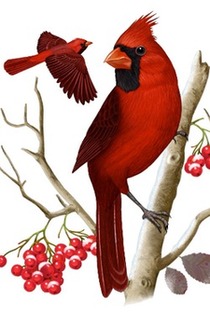
Gorgeous art
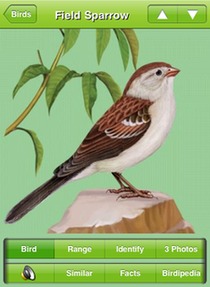
Not so much
The number of illustrations is still somewhat limited, with most species having only one. That means for many species that have different plumages (based on age, gender, season, subspecies, etc), only one of them is shown, usually the male. However, the inclusion of photographs greatly reduces the impact this has on the user.
Multiple photos are included for most birds. They are sized so that each one fills the available real estate on the screen, and they look great on the device.
Between the paintings and photos, most plumages are illustrated. As expected, extremely variable groups like raptors and gulls have a much smaller percentage of plumages represented. But that’s the case with most general field guides. However, there are some plumages missing that are really surprising. The only Cerulean and Chestnut-sided Warblers shown are breeding males (that includes both the illustration and photo sections). Additionally, the Red Fox Sparrow is the only one of that complex shown.
Sounds
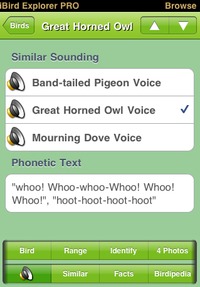
Almost every species includes one vocalization, which is played when you tap the sounds tab on the account page. Where appropriate, there is also a list of similar sounding birds that you can play from the same screen, making direct comparisons very easy. Lastly, a description or phonetic text of the sound is given.
Playing a bird’s vocalizations from within a field guide is obviously useful, though having just one sound each is very limiting. However, the editors are now adding more sounds per bird through software updates. I don’t know if the sound selection will ever be extensive enough to make any other sound collection on your device obsolete, but it certainly has that potential.
You can also play a random song by giving the device a shake. You can use that feature to give yourself a quiz.
Navigation
This is where the app really shines. If you know the name of the bird you want to look up, or just want to browse through the species, then the Browse screen is for you. You can browse by either species or family. Species can be sorted alphabetically by first or last name, and families either alphabetically or taxonomically. Or you can use the search box and look for a species by common name, latin name, or band code.
But what if you don’t know the name of the bird you want to find? You’ve just seen something new and are not sure what it was. In that case, switch to the Search tab. Here you will find 33 different criteria that you can use to filter 900+ birds down to a manageable few. Everything from location to primary color to cere color is included.
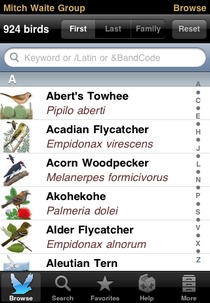
Browse Screen
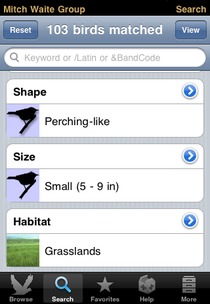
Search Screen
Issues
No field guide is without mistakes, and this is no exception. I’ve found mistakes in range maps (wrong color used for American Dipper), illustrations that had some weird colors, and species’ attributes set incorrectly (which affects the search functions). But the difference between this and print guides is that this one can easily be updated. If you find an error, report it. I’ve done so and the email response from an editor came back ridiculously quick. They are constantly releasing updates to address issues and add new features.
Updates
This is one of the primary advantages for digital field guides. iBird has had several updates recently, fixing bugs and adding features, paintings, photos, sounds, and even new species. When a new update is available, users can easily install it using iTunes. And to make a good thing even better, these updates are free.
Recommendation
So will digital field guides make print versions obsolete? Before using iBird, I would have thought not. But now, I’m not so sure. I don’t see reference books going away anytime soon; I still find it much easier to learn the birds and their field marks using a printed guide. Here I’m thinking of guides such as the “big” Sibley and hardcover Collins guide. But I can see how field guides as identification tools, especially in the field, may evolve into the digital realm. iBird could certainly be your primary field guide today.
I would recommend iBird to most birders with an iPhone or iPod Touch (heck, it may be worth getting one just to have this app). It is one of the best iPhone bird guide apps, and the people behind this project have shown a commitment to continuous improvement. The main issues I have with the app (missing and sub-par illustrations) are being incrementally rectified with each update. And there is so much that you can do with it now. Having a field guide – actually, make that a field guide, sound collection, and natural history reference – that you can have with you everywhere is just incredible.
Which version?
Ok, so you’re interested in iBird. Now you just have to decide which version you want. Here are the currently available versions, with the number of birds included and the price (subject to change):
- iBird Explorer Lite (60) – Free
- iBird Yard+ (235) – $2.99
- iBird West (830) – $6.99
- iBird North (537) – $6.99
- iBird South (748) – $6.99
- iBird Midwest (558) – $6.99
- iBird Canada (686) – $6.99
- iBird U.K. and Ireland (283) – $14.99
- iBird Plus (938) – $14.99
- iBird Pro (938) – $19.99
I think most birders will want the Plus or PRO versions. Check out the extra features of the PRO version to see if it’s worth the extra money to you. If you’re not sure, go with Plus. If you later decide you want more, you can upgrade from Plus to Pro for $10.
If you’d like insight into the creation of this app, check out the This Birding Life podcast, episode 20. It features a revealing interview with the app’s creator.
Disclosure: I get a small commission for purchases made through links in this post.
Disclosure: The item reviewed here was a complementary review copy provided by the publisher. But the opinion expressed here is my own, it has not been influenced in any way.

 (7 votes, average: 4.43 out of 5)
 Loading ...
Wow this sounds like an amazing product. Would I be able to run it on an iPod touch or do I need an iPhone? And how does it compare to the other products like the one from Audubon?
“So will digital field guides make print versions obsolete? Before using iBird, I would have thought not. But now, I’m not so sure. I don’t see reference books going away anytime soon; I still find it much easier to learn the birds and their field marks using a printed guide. Here I’m thinking of guides such as the “big” Sibley and hardcover Collins guide. But I can see how field guides as identification tools, especially in the field, may evolve into the digital realm. iBird could certainly be your primary field guide today.”
You may want to broaden your view to include the Apple tablet – imagine what will happen to field guides when this device appears? Will it’s book sized screen with text that flows like water along side beautiful full page drawings, with illustrations that can slide thru a sequence of species variations, playing it’s song as the images dissolve and fade in and out, coupled with pages that seem to turn in 3D change the way the world looks at the printed book?
@Jessica: Yes, this will also work on an iPod Touch. You can find a comparison to the Audubon guides, along with others, here:
http://www.birderslibrary.com/features/iphone-bird-guide-comparison.htm
It also links to a very detailed comparison table that iBird has put together.
@Mitch: I really haven’t followed the news about the Apple Tablet. But considering how much I like the iPhone, and all the things that it is capable of, I really wouldn’t be surprised to be blown away by it. Y’all have created a great app for the iPhone, and I have no doubt you’ve got big plans for the Tablet!
Thank you Grant that is a great comparison and based on it I know what app I am going to buy. What an exciting time to be a birder. It sounds like Mr. Waite has some good insights into the future of birding, but now I am wondering if I should wait until the Apple tablet comes out before I buy a birding program. Is there any possibility that these apps will work on the tablet as well as the touch?
Sibley is out on Iphone – go check it out. It’s great!
Sibley is a major disappointment. Maybe he was so busy writing about trees he never looked at what a good bird app looks like?
Tiny drawings can’t be zoomed, interface is crude and not intuitive, only value is the bird calls. No photos either. I’d like to see it reviewed on this site and honestly compared to the other apps. Meanwhile I’m asking Apple for a refund.
Thanks for the heads-up. I knew a Sibley app was inevitable, but didn’t realize it was released yet. I’ve requested a copy, so hopefully I’ll be able to review it soon.
Thanks, I will look forward to a review of Sibley app and comparison to iBird.
At first look, iBird is confusing, I need to look closer, but my current impression is the iBird Pro has all the features of the there other products plus a little more.
Another concern is that I can give/sell my paper Sibleys if I did not like it by can not transfer an APP to someone else.
[…] from free to $30! One app that every outdoorsman or amateur bird watcher should have on hand is the iBird Explorer. With iBird Explorer Plus and PRO, one can describe the bird they see or know the name of, plug […]
Had an older version of IBird Pro with Canyon Wren call. Got an updated version of IBird Pro recently and the call of the Canyon Wren is different. The first one was MUCH more link I remember Canyon Wren just outside Denver. Now the sound is there but not quite the same. What happened? Would appreciate a response.
@L.A. – I have the latest iBird version already installed, so I can’t make the comparison myself. My guess is that they figured the new one works better somehow. You can try asking in this iBird PRO forum
Ask about the Wren call at ibirdblog.wordPress.com
I cannot adequately express how disappointed with this app (iBird Pro) I am. Extremely small variety of songs, REALLY confusing and hard to use, and quite a few species are actually missing songs/photos/range maps entirely.
Tried out most of the other birding apps available for Android, such as Sibley, Audubon, Merlin, etc. and found them ALL to be light-years ahead of iBird in terms of user interface and functionality. Was iBird designed in 1981? It sure feels like it. After paying such a hefty price for an app like this, I expected a much higher quality of product. I personally found iBird to have a surprising deficit in the customer care department as well. For a paid app, this really shocked me.
I’ve since switched to the Sibley eGuide to Birds (same price as iBird Pro) and the Audubon Birds of North America apps (totally free!), and am much happier. Both the Sibley and Audubon app have a way better user interface (I spent months using iBird Pro and STILL didn’t fully understand how to use it!), and also seem to have a much larger database of bird vocalizations, more photos, and more detailed range maps. Sibley and Audubon also seem to have more features than iBird (such as recent sightings maps based on your location, much more detailed similar species sections, more information on the birds themselves, and integration with eBird).
Anyway, just my two cents. When iBird Pro first came out, I too was quite excited about it. However, after my experience with the app itself and their developer and customer support teams, my excitement quickly faded into frustration and dissatisfaction. I spent a little time investigating the other competitors on the market and have been pleasantly surprised. I recommend that others try out the completely free “Audubon Birds of North America” first, and the “Sibley eGuide to Birds” app after that if you desire to spend money on a birding app. I sincerely feel that these two apps are light-years ahead of iBird Pro for countless reasons!
Eric Graham doesn’t sound like he is reviewing the recent version of iBird Pro 6 for the Android. iBird has over 2,600 bird songs with an average of 4 vocalizations per species. The recordings are from the best bird recordists in the United States. Indeed they are the same songs used by Sibley which he claims has better songs. Go figure.
As far as user interface and functionality iBird is considered the state of the art in design friendliness. To say something is “more or less functional” and not say exactly why is the sign of a rant rather than a review.
Here are some facts: iBird has 16 different species menus covering General (Overview and 1 to 4 illustrations with field marks), Range Map, Photos, Sounds, Similar, Journal, Identify, Ecology, Facts, Notes, Behavior, Family, Nest and Eggs, Flickr, Glossary, My Photos and Birdipedia. Compare that to Sibley which has General description, Voice, Known as, Range, Song. iBird has the equivalent of 14 full field guides. Neither Sibley or Audubon come close to that. Its one of the reasons that iBird’s database is twice the size of the other other apps. Another reason is iBird has BOTH illustrations and photos and they can be zoomed up to 400%. Audubon has only photos and can’t be zoomed at all and are extremely small.
iBird has a powerful search engine with 35 search attributes. Audubon has 9 attributes and Sibley has just 5. If you want to know the bottom line in what makes a great birding app is read “The Quest for a Bird Identification Key” in ABA magazine, Diana Doyle, St. Augustine, Florida,
http://ibird.com/wp-content/uploads/2014/10/Birding_Quest_Bird_ID_Key.pdf
The way the last paragraph ends in the Graham review sounds like they were paid to write it. Light years ahead without one fact about what that means is not a review.
Mitch Waite,
I was not paid to write my review of your product.
I actually did provide plenty of details/facts as to WHY I believe that your product is light years behind the competition, for example:
– user interface
– bird vocalization database
– photos
– detail in range maps
– features such as recent sightings maps based on your location, much more detailed similar species sections, more information on the birds themselves, and integration with eBird
– the developer and customer support teams
So your claim that I haven’t included “one fact about what that means” is incorrect.
Your claim that my review is actually a rant rather than a review just speaks to the level of attitude and denial that I have consistently received in all my dealings with customer support at iBird.
iBird may use the same recordings that Sibley does, but it certainly does not use ALL of the recordings that Sibley does. The Sibley app has more songs per specie than iBird does, plain and simple.
You need to look up the word “facts” in the dictionary my friend. Words like “more” and “better” and “details” which you only use, are qualitative judgements. Facts are numbers. which don’t lie and can’t be refuted. I go back to my original response which you are welcome to dispute:
iBird has 16 different species menus. Sibley has 4.
iBird search engine has 35 search attributes. Sibley has just 5.
iBird has illustrations and photos. Sibley has only illustrations.
Here is another fact that might help you with your confusion.
Range maps. For example, Dark-eyed Junco:
iBird has 3 range maps. Sibley has 1. iBird shows separate maps for breeding and winter migrations. There are a total of 37 species which have complex migration routes. Sibley has one map for every species.
Anyway if you are going to rant about apps you need to do your home work and stick with the facts.
Hi again Mitch Waite,
Thank you for your continued response. Your posts illuminate the arrogant, ignorant nature of the iBird staff for the rest of the world to see.
Cheers!
– Eric
I’m not a heavy-handed moderator of comments, but I’m going to have to cut this off. Please don’t make me shut down comments on this post.
Grant I understand your decision to cut off the conversation and support it. I’ve tried to stick to the facts in comparing features and hope it helps people trying to understand the value of these app.
I’d like to add my own 2 bits to the conversation. I’m the lead illustrator for iBird. I know the calibre of people we have putting together iBird, and far from ignorant or arrogant, they are experts in their fields who work damn hard to produce the best Birding app on earth. We are extremely proud of what we do, and strive to be the most accurate, up to date, field guide possible. We do our work putting ourselves in the position of a birder trying to identify the avian wonders that they see, not difficult as we are all mad keen birders ourselves. That attitude comes from the top down. Mitch always listens to our ideas & pushes us to do better, and we enjoy our jobs immensely as a result.
Currently he has me adding juveniles, females & subspecies to older illustrations where applicable, and the research this involves is something I love. iBird will continue to improve with every update, and despite my job I really do believe it’s the best app to have on your phone in the field.
[…] people don’t realize it but there are 42 New World sparrow species and 1 Old World sparrow species (the House Sparrow) in the US. Some […]
I purchased this app for 30$ years ago and like many others I cannot use the app anymore due to the greed and oversight that Mitch Waite Group has caused.
I finally figured out why I cannot use the app anymore and its do to the fact that MWG want to change an additional monthly subscription.
Ive since reached out to MWG and had no response only the sounds of crickets when asked about additional fees after a pricy purchase.
Buyer beware!!!!