
Digital cameras, digital photo frames, eBook readers, it seems like the whole world is going digital these days. And now digital field guides are here. You can think of these as traditional field guides on steroids, yet even smaller.
You still get the regular stuff found in field guides: illustrations, range maps, basic identification and natural history information. But the format also allows for much more. You can play a bird’s song from within the field guide. Or access information that otherwise would have required cracking open another book or doing an internet search.
Aside from the portability, possibly the best thing about the medium is that it allows you to search for a bird in so many more ways. For instance, if you don’t know the name of a bird you want to look up, you don’t have to go looking through the accounts as you do in a printed guide. Just input some characteristics in the search function, and the guide will narrow down the possibilities for you.
There are now several digital field guides available to birders, mostly for the Apple iPhone and iPod Touch devices. This is a brief comparison of those for North America.

Audubon Birds — A Field Guide to North American Birds
$4.99
Website
The Good
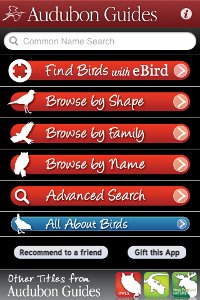
- Find birds with eBird (similar functionality to the BirdsEye app)
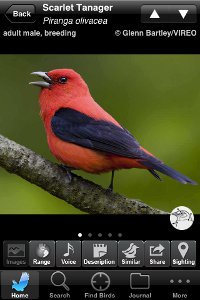
- Good selection of very nice photographs
- Great selection of sounds (essentially the same sounds as Sibley)
- Most migrants have a second map showing winter range
The Bad
- The interface is very slow compared to the other apps here
- Can’t browse species taxonomically
- Journal and list functions are confusing and not very useful
Audubon is the only one of these apps to exclusively use photos for illustrations. They’re nice and work pretty well. But I don’t particularly like the interface (the design and, especially, slow response). The biggest plus this app offers is the hook into eBird for finding birds, which is especially useful if you don’t have the BirdsEye app. (I think BirdsEye does this slightly better than the Audubon app, but is more expensive and obviously doesn’t also come with a field guide!) Overall, the Audubon app is an acceptable field app, especially for those who prefer photos to drawings.

iBird Pro Guide to Birds
$19.99
Website
The Good
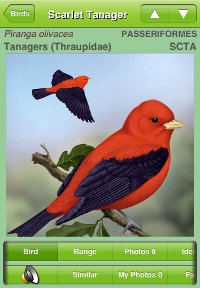
- Includes both art and photographs
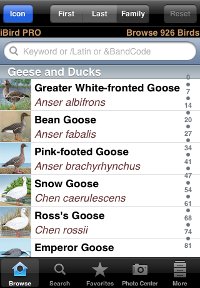
- Number of species included (926), and includes Hawaiian birds
- Includes a lot of interesting facts and natural history information
- Powerful search engine / filtering capabilities
The Bad
- Number of illustrations is very limited, with many only having one (females and immatures are often neglected). The photos, however, help make up for this
- Price
- Lack of sighting system/lists
- Quality of some illustrations is poor
iBird has been greatly improved since I first reviewed it, with added sounds along with new and improved illustrations. This is perhaps the best app for newer birders. However, the lack of variety in illustrations and relatively poor treatment of difficult-to-identify species means that it will be less useful to more advanced birders.
Note: there is now an iBird Ultimate version, which includes even more features.
Try out iBird for free with iBird Lite Guide to Birds, which includes 60 sample species.
Full Review of iBird Explorer app (Note: I need to update this review to include the latest app improvements)

National Geographic Birds: Field Guide to North America
$9.99
Website
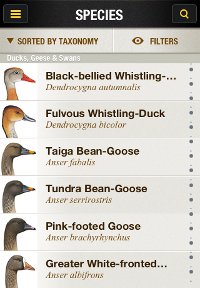
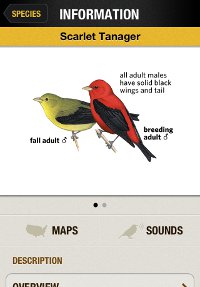
The Good
- Number of species included (995, the most of any app)
- Great sound interface, including similar sounding species
- Includes more information – similar species, winter ranges, natural history, etc – than the field guide
- Extras such as quizzes and videos
The Bad
The images are relatively small on the screen. You can zoom in, but since the size of the area dedicated to the image doesn’t change, it doesn’t help much. And the image quality doesn’t quite hold up when zoomed in.With the latest update, when you zoom in far enough it will show the image full-screen. And the image quality looks much better. It’s still an awkward operation, but at least you can do it now.- List functionality has potential, but not really useful yet
The latest print edition of National Geographic Birds is a great field guide, but I was surprised to find that this app not only does justice to it (with the exception of the small images), but actually improves upon it in surprising ways. For instance, it not only gives a list of similar species, but also specific tips on how to differentiate them. And it does this for every bird, as far as I can tell. This, combined with a good selection of sounds (and a great interface for playing them), makes this app a useful one in the field.
Try out this NatGeo app for free with Birds Lite by National Geographic, which includes 70 sample species.

Peterson Birds of North America
$14.99
Website
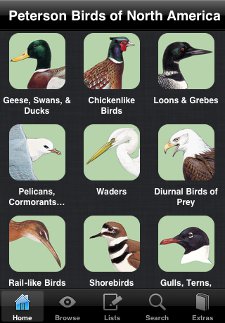
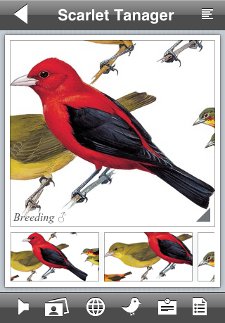
The Good
- Great list feature that allows you to import/export lists
- Incorporates information from seven other books in the Peterson Field Guide series (including, for example, the entire text from Molt in North American Birds)
- Works and looks great on an iPad
The Bad
- Sounds – the worst selection (only one per species) and interface for playing them
- Interface doesn’t work as well on an iPhone
This app does a good job of presenting the Peterson field guide, as well as many other sources from the Peterson guide series, in a digital format. It makes a very good reference app on the iPad. And for the price (currently $4.99, though sometimes on sale for even cheaper), it’s a great deal. However, due to the limited sounds and the iPhone interface, I don’t think it works well as a field app.
There is also a Peterson Birds Pocket Edition app. For only $0.99, you get ALL the species of the full app, including all the field guide illustrations, sounds, maps, and species account text. But you lose some cool features, like the additional Peterson guide content and the list capabilities. This version is an incredible bargain.
Full Review of Peterson Birds of North America app

The Sibley eGuide to the Birds of North America
$19.99
Website
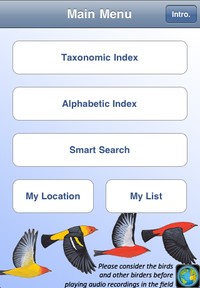
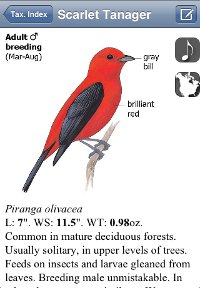
The Good
- The best illustrations of any North American field guide (in my opinion), and includes the greatest number of illustrations per species
- Only app that allows you to compare portraits, sounds, and range maps of any two species on the same screen
- Great selection of sounds (essentially the same as Audubon), and a good interface for playing them
The Bad
- Price
- Filtering capabilities are relatively limited
- Lack of extras like natural history information, social media sharing, etc
I love always having my Sibley guide with me via this app. The print edition is still my favorite field guide, and this app is likewise the one I turn to first, even though it doesn’t have some of the information and features found in other apps. Basically, what you get is the contents of the print guide plus sounds, filtering, and list features. But the main content – the illustrations and sounds – are the best.
Try this app out for free with The Sibley eGuide to the Birds of North America LITE, which includes 30 sample species.
Full Review of The Sibley eGuide app
So which one of these bird apps belongs on your device? It depends on how it will be used. For use in the field viewing images and playing sounds, I prefer the Sibley app. But Audubon and NatGeo also work in that regard, and each bring different feature sets that other apps don’t have. iBird is a little different, in that it may be the best app for beginners (easy to use, great filtering), but experienced birders will be frustrated by the lack of variation depicted. As a reference (especially on an iPad), NatGeo, iBird, and Peterson are great because of the extra information they include. Peterson, especially, contains a LOT of reference material, looks great on the iPad, and is an exceptional value.
For a more detailed comparison of features, here are a couple more resources. Robert Mortensen, of the Birding Is Fun! blog, has a useful Feature comparison table. Also, the folks at iBird have compiled an extensive comparison. (Keep in mind that one of the competing companies produced this table, and there are a few oversights/mistakes as of this writing. However, overall it appears very fair and objective to me.)
Finally, I wanted to mention that all of these apps, except iBird, feature some sort of listing capabilities. You could keep a life list or record sightings on them, but honestly, I don’t see why you would want to. None of them work very well for that. However, Peterson and NatGeo offer some additional listing capabilities that could prove very useful. In Peterson, you can create, import, and export various lists. You can think of them as analogous to playlists for mp3’s. NatGeo is more limited right now, as you’re limited to creating lists or using a few pre-packaged ones.
More Bird Apps
- Bird Listing Apps for iPhone – a similar comparison I’ve done for listing apps available for the iPhone
- BirdsEye – a bird-finding app utilizing eBird
- birdJam HeadsUp Warblers and HeadsUp Sparrows – warbler and sparrow-specific apps
Posted by Grant McCreary on December 15th, 2009.



Thanks for this roundup, Grant. It’s great to see how many birdbook-like resources are out there for iphones. There’s also the BirdsEye app (full disclosure: the Cornell Lab contributed to it). It’s not really a field guide, though it has photos and bird-finding advice, but your readers might be interested in knowing about it if they haven’t heard of it already. It’s more of a bird finder – using eBird records to show the user maps of nearby bird sightings they might be interested in. More about it at our blog: http://birdsredesign.wordpress.com/2009/12/03/new-ebirdiphone-app-puts-local-knowledge-in-your-pocket/
Like I said, not exactly a field guide app, but worth knowing about. Thanks for the post! – Hugh
Hey Hugh,
I’d seen the announcements for BirdsEye, and it seems like a great idea. As you said, it’s not really a field guide type app, so I didn’t include it here. But it definitely deserves a mention, as it’s something I imagine alot of birders would be interested in. Me included.
Thanks for this post. I just got an iPhone and I’ve been reading up on which birding apps to try / buy. I wish they all had trial versions (I could only find free versions of iBird Explorer and Audubon). Another app I found that’s not a guide but might be of interest to birders is the game BirdJam Twitch.
I’m a birder, and I use the Peterson Field Guide to Backyard Birds for my iPod touch. I think that the chart you have doesn’t reflect the current version (2.0) of Peterson. The app definitely has search features (by name and family group), and I think the iTunes store rating is higher for this version than for the last one. Also, each bird does have multiple types of calls (in addition to the main song of each bird). I think, especially if you compare prices, the Peterson app is really great, especially for beginner birders. There are 180 birds which is more enough for most casual birders — and its really easy to make identifications with this interface. I just find it really easy to use, and fun. The quizzes help me learn bird songs and field marks. I guess for me it’s the Peterson images that really do it, since that is what I learned on. They’re still spectacular, and it’s great that I can carry them around in my small iPod. Overall, I think the Peterson app is the best value and easiest to use.
I see a Sibley eGuide to the Birds of No. America. Released Feb 10 1010, V1,0. I would like to see comparisons/review. On user of iBird Pro likes it better at the iTunes Store.
There were a couple comments about the Sibley app on my iBird review. I hadn’t realized it had been released. I’ve requested a copy, so hopefully I can compare it to the others soon.
Added the new Sibley app to the list, along with a comparison between it and iBird.
Also, check out the Comparison table from iBird again. They’ve also added the Sibley app.
Thanks for the update to include Sibley app. The Comparison table is great and I think I will go with iBird. Sibley need to put a lite version of Sibley app to try like iBird did. Great job!
I am surprised you made no mention of BirdJam (www.birdjam.com). I am shopping for an iTouch and birding software. From their website, I gather Birdjam is not a full field guide like those your reviewed, but rather an application that focuses on bird song. I would be interested in any of your comments and experiences with this software.
Birdjam’s iPhone app appears to be a game only called “birdJam Twitch”. And “birdJam Maker” appears to bird songs added you your iPod and using the built-in iTunes interface to present bird information, much like an a music albums and podcast.
This is from their web site: “*Via iTunes, Apple’s free music management system that you’ve installed on your Windows or Mac computer.”
The bird apps here are custom programs to work on the iPod Touch and iPod Phones. They all required much more (software programing skills and multimedia skills) to create.
I have been using iBird Pro now for a couple of months and have left my Sibley guide in the car. There has been a learning curve and so far OK. I still us the book for that occasional mystery bird. iBird has been a good reference to jog my memory.
One thing I would like in iBird is that it keep my place when switching APPs. Perhaps that can be addressed along with the upcoming iPhone 4.0 OS. I am using a GPS tracking software on the iPhone to record my position/time and later sync it with my photos and notes.
Thanks for the info on the Birdjam apps, Allan. I don’t have any experience with them. Honestly, the Sibley app comes pre-loaded with just about as many sound files as birdJam (which uses the Stokes CDs). And iBird will be adding more sound files as well. So using one of those apps pretty much makes the iTunes based sounds obsolete. Or, it does for me anyway, since I haven’t found a good way to organize my bird sounds in iTunes yet.
As for other non-field guide apps, there is a Birdseye app that pulls/inputs data from eBird. Looks like it would be incredibly useful, especially when birding in unfamiliar areas.
Not obsolete yet. My collection of bird vocalization in iTunes was recorded in So. California, Orange County, where I spend most of my time. Like our US English, there are many accents. I don’t recognize some songs that are in iBird. I do like the part (iBird) were people can contribute there photos of birds, it helps, I think the drawings in iBird could be better, I like the illustrations in the Sibley North America guide.
Thanks for the lead on “birdseye” app, I will take a look at it.
Is there a European version of Birdseye? Or does it work to report and see reports from Europe?
According to the BirdsEye website:
Currently BirdsEye only includes birds for the continental United States and Canada. We hope to add support for more regions in the future.
However, BirdsEye is based off of eBird which does not cover Europe. So there seems to be little chance that BirdsEye will include Europe anytime soon. There may be other apps that do, but I’m not aware of any offhand.
…although eBird just announced a beta version of eBird world will be out soon, so you never know. The news is here: http://ebird.org/content/ebird/news/global-ebird-underway-27-may-update Take care – Hugh
Wow! Well, it may indeed be sooner than I thought.
John, for now though, it still looks like you would need to look elsewhere.
The Sibley iPod field guide app was just updated. As promised, it now has high resolution bird paintings that can be enlarged and displayed in both portrait and landscape views. The original ones were small and looked as if they were scanned from printed copies. They now really POP! The range maps now enlarge when tapped, but only display in portrait format. You can now move to the next image with just a swipe rather than pushing the “next” button, and switch between description and image by simply tapping.
Additional calls and songs have been added for a number of species, but there now appears to be a bug that I’m sure will be corrected soon– the updated song of the Sedge Wren does not display– the song icon erroneously links to the iPod song feature, at least it does in my iPod Touch. Not sure whether it affects updated sounds of other species.
Now, if Sibley could just add information about breeding biology and life history… I’d even spring a few more bucks for such an enhancement.
The “bug” in the updated version 1.5 that I mentioned in my June 4 post was corrected by simply deleting and re-installing the app. Now all the calls and songs appear to play correctly.
I found a bug in iBird Pro: American Robin>Call/Song>Similar Sounding>American Robin Voice, has no sound. When you go to other bird Rose-brested Grosbeak>Similar Sounding>American Robin Voice, it’s also empty. I have sent email to Mitch Waite Group but I don’t think they read their mail. I can try re-installing, but afraid of losing the APP in uninstalling.
@Ken: I had the same problem with all of the species whose songs were updated in 1.5. But the same fix worked for me too.
@Allan: Weird. My link from Robin to Grosbeak works, but not vice versa. I’ll forward your report on to Mitch.
Re. the Robin Voice bug. I’ve uninstalled it on my iPhone and added back from iTunes and it did not fix the empty robin voice. I think I have the most current version of iBird Pro, in the More area it said “About iBird 2.3” and did not see any updates for it.
iBird Pro 3.0 – seem this latest version has fixed fixed many of the bugs I wrote to them about.
You may be interested in the app i wrote – My Bird Observations. Records bird sightings and loads to eBird.
As usual our American friends live in a bubble called the USA. Although these applications are very good it is not made clear until you delve into them that they are exclusively dealing with North American birds not the rest of the world. Why don’t they make this clear in the title of the software.
This is the WORLD WIDE web not the US web, so it would be useful for all of us if you made it clear that you are only dealing with a specific region of the world. Go on try it! Try to imagine a world beyond the Mexico and Canadian borders (let alone those large expanses of water with those scary places called continents).
Peter, Welcome to our “bubble”. When I did my homework before my purchases, I did notice that all references were for North America at the developer sites.
I have birded on other continents and I find guides for those places before I go. So with the resources available on the web I was able to make my choice of guides for the “bubble” and the rest of the world. With the resources on the web, I was able to find local birders to bird with when I traveled.
Since I am exposed to technology developments here in the “bubble”, they tend to be geo-centric until developers/birders on other contents get into the technology. You can be that person?
I should note that the above-mentioned “My Bird Observations” is a listing program application that appears to be global in scope. It has filters for many different countries around the world. Understandably, as a new app under development, we can look forward to much more sophisticated filters and search tools, and I am confident that Gina is working to improve them. For Peter’s information, this app breaks the “bubble.”
I found it very easy to upload my sightings to eBird (via the free Box.net service) from my iPod Touch. If its interface could be filtered down to smaller locales (as we have in the eBird data entry page) it would be much easier to use in the field by simply updating the species and numbers along the way. It produces a file that meets eBird standards for importing data. (Forgive me, Peter, but I hope the first set of filters will be at the USA State level) It is cheap, and certainly worth a try. If you have questions, Gina is very responsive to inquiries.
I forgot to mention that Gina asked for suggestions as to how to filter the huge species (and family) data base. I’m sure she would welcome input from birders all over the world.
@Gina: I’d love to check it out. You’ve got mail 🙂
@Peter: It’s hard to avoid the “bubble” mentality sometimes. In my reviews, I try to make it clear what geographical area the book/app/etc covers, but I’m sure I don’t always do a good job of that.
On another note, I recently posted a review of Birdcountr, a listing app (for North America). I’ll be interested to see how “My Bird Observations” compares to it.
@Ken: I think my next two releases will help a lot with local filtering. In version 1.5 (which is waiting for app store approval right now) I’ve added Templates – lists of birds that can be used to pre-populate trip lists OR filter the bird DB. Creating a template is mostly manual and could take a hour or two for a 400 birds. I’m working on version 1.5.1 which will add the ability to create templates from text files. Using files downloaded from eBird or some other online source it takes minutes to do a 600 bird template.
@Peter: anywhere in the world
Just released My Bird Observations 3.1. Now includes The British List bird names
New is an Australian eguide from the same publisher as the Sibley guide. So anyone familiar with the Sibley eGuide, will be right at home with the Guide to Australian Birds. With same publisher, and same basic framework, we have tried to further developthe app functions further. Foremost is a more detailed ‘Smart Search”, with more in that direction planned to include in nest version . For anyone thinking of a birding trip to Australia, this would be a no-bulk way of in-flight study of those birds…or before departure.. On arrival, the matching paper guide is widely available. This new app can be seen on the Sibley page at iTunes, just click the Golden Bowerbird icon.
[…] Camping and Hiking Apps for iPhone Top 5 iPhone Hiking Applications I Wouldn’t Mind Seeing (or Using) Outdoor iPhone Apps: Guidebooks Go Mobile YouTube The 25 Best Outdoor iPhone Apps 12 iPhone Apps For Exploring the Great Outdoors iPhone Bird Guide Comparison […]
While the online field guides are packed with tons of information, an iPod Touch or iPhone screen has been hard to read in the field. birdJam just released a new app designed specifically for warbler ID in the field: HeadsUp Warblers. The display is uncluttered and the app includes the most comprehensive collection of songs, sounds, calls and chips from the famed Macaulay Library at the Cornell Lab of Ornithology. We’ll be interested in your reaction.
I just returned from two weeks in Australia. I had both the Michael Morecombe “e-Guide to Australian Birds” mentioned above, as well as a paperback version of the Slater Field Guide to Australian Birds (2d ed). (Where I live, I use iBird extensively, and have the National Geo e-guide which i only occasionally use.)
I found the e-guide to Australian Birds wonderful to use on my iPod Touch. The three main advantages compared to Slater are (1) the much lighter weight and smaller size, (2) the inclusion of song samples, and (3) the ability to filter the search results by region (e.g. Victoria, Southeast, etc)). I found myself generally leaving Slater in my car for reference if I needed it and only taking the e-guide with me into the field. I did not find the iPod Touch screen difficult to read in the field.
I jumped right into using the device, and did not read the intro or help sections until later. This worked, but in hindsight I do recommend reading the intro first — it took me a while to figure out that rotating the iPod to landscape gave a larger version of the picture, and rotating it back to portrait mode returned to the default view. Also, I did not fully appreciate the compare and smart search functions until towards the end of my trip.
I liked the “My List” function that let me track my sightings. The main feature I would like in the next revision is suggestions for similar-looking species. I saw and photographed a juvenile White-throated Gerygone that lacked most of the adults field marks, and I found myself thumbing through 1/2 the Slater Field Guide for an hour before someone else suggested this ID.
Overall, I would highly recommend this product for birders going to Oz, and hope the publishers do similar guides for other locations (hint: Costa Rica!)
Thanks for the review, Jim!
Grant,
This is a great resource. I’ll jump on the bandwagon with a couple of people above: I would love to see reviews of bird apps other than field guides … which is admittedly a harder job since they are not conducive to apples-to-apples comparisons.
Limiting this to Field Guides (i.e. apps that imitate books) could in the long run mean limiting it to the least interesting / game changing apps.
I’m working on an app called BirdsEye that is mentioned a couple of times above. Let me know if you want to check it out.
Thanks again! Dave
@David: You’ve got great timing, I’m working on a companion page comparing some listing apps. Not sure BirdsEye fits that category, but I’d still love to check it out.
This page has been updated with the new, comprehensive Peterson app.
Also, if you haven’t seen it yet, I’ve created a similar comparison for listing apps
[…] from the popular iBird Pro to NatGeo, Birdseye and Sibley and Audubon’s iPhone app. This review gives a comparison of these phone apps for birding. This entry was posted in wetlands and […]
[…] from the popular iBird Pro to NatGeo, Birdseye and Sibley and Audubon’s iPhone app. This review gives a comparison of these phone apps for […]
I was thinking about a variation of the Soundhound (nee Midomi) concept: you hear a bird, press a button, it transmits the sound to a database of bird sounds and returns the info on the bird, including its picture. Has anyone done this yet? Perhaps it could be coupled with a highly-sensitive, directional microphone that could plug into the iPhone….
Just found a wonderful app for my iPhone – Bird Song Alarm Clock. A really nice bundle of bird calls and songs and of course all the fixins you would expect from a high-tech alarm clock. It will even play a random sound each morning, really cool.
I have been using the BirdTunes app on my iPod Touch for several weeks now. It is an excellent compilation by Lang Elliot (of Stokes CD fame) and other prominent recordists. It is very easy to navigate, usually includes several clips of songs and calls identified by location, features a sonogram and one or more color photos of each bird, and there are no annoying human voices. Recent searches are saved (which I find to be a most useful feature), and you can also compile all your “Favorites.” Notably, the recordings are almost entirely free of loud background noises and sound from other species, something that detracted from the Stokes CD collection.
@Fred: That has to be a better way to wake up than with the standard alarm sound I use!
@Ken: Sounds interesting, especially the sonogram. iBird added that recently, but it’s not quite the same format as the sonograms that you see in books such as The Singing Life of Birds
Would someone who has all the apps tell me if any use the same photos and illustrations? I have I bird pro and want another app or two just for more photos/drawings, don’t want to get one that duplicates what I have. Thanks!
@Kathy: there are no duplicate illustrations. The Sibley, Peterson, and NatGeo apps all use the paintings from their respective print field guides.
Thanks for your reply Grant, now to decide which one to get!
[…] looking to compare birding application, iBird.com has a useful chart, and there’s a great review of birding applications here as […]
I wish somebody would publish an app that combines Shazam and bird songs. I’d like to be able to have my phone tell me what that bird is singing in the oak tree right now. Is anybody aware of anything like this, or is anybody working on it?
@Lynda – check this out
Do you know if there is application for IPod Touch on Birds of Kenya? Birds of Panama?
I have been in Brazil with the app Birds of Brazil. Great!!
@Michele: There’s one for Southern Africa based on Sasol Birds of Southern Africa, but I don’t think that covers Kenya. And I’m not aware of anything for Central America, unfortunately.
[…] Comparison of Bird Apps for the iPhone – The Birder’s Library – A look at the bird field guide apps for New Sibley iPhone app; Review Roundup: February 11, 2010; Birding Lite: A Humorous How-to Guide for All Who Enjoy Watching Birds preview […]
[…] Birders Library recommends several Bird Apps for the iPhone. Share this:TwitterFacebookLike this:LikeBe the first to like this […]
I bought the sibley app this year and use it a little, i hate using sibleys taxonomic organization,and pretty much all of the navigation for this app. it is also very incomplete which makes it useless as a stand alone guide you would need to also have a real book guide for all the species you would encounter. there is no Wrentit (a common bird here in southern oregon) also only one cormorant, probably a great many other birds are missing. this app needs a lot of work and at the cost they are charging it should be complete. for what a really good iphone birding app looks like check out birds of northern europe. this one has everything you would want and easy navigation, lots of background info,great range maps, photos, illustrations, lots of calls. but i would pass on sibley.
Chris, what version of the app do you have? I can personally only speak for the iPhone version, but I can assure you that it does include Wrentit and all the cormorants. Plus, you can view the list of birds in either taxonomic or alphabetical (by last name, i.e. Warbler) order.
It sounds almost like you have a “lite” version of the app, but as far as I’m aware, there aren’t any for the Sibley guide. If you have a full version, then I’d suggest reinstalling it. If you still don’t have all the species, then I would suggest contacting customer support.
Here’s the app I’m waiting for — Shazam for bird calls. One of the authors is a geneticist. Geneticists use sloppy match algorithms to line up DNA, so they applied that approach to bird songs.
http://infodocket.com/2011/10/12/coming-spring-12-bird-song-app-identifies-feathered-friends-by-tweets-shazam-for-birds/
This may be the app Grant was referencing, but his link didn’t show for me. Great site, Grant.
Lynda, yep, that’s the one I was referring to! I’m looking forward to it, too.
Don’t know why the link didn’t work – weird.
[…] the 4am loud birds singing alarm. They sound unlike most that I have ever heard. I almost want to download a bird app to identify the cheerful lot. But, the cost is a touch prohibitive compared to asking someone, once […]
Thanks for the bird app info. Do you have any info/reviews related to birding games? Something to test and hone birding skills perhaps by habitat and geographic region?
TIA
@Judy: for learning birdsongs, check out Larkwire. I’ve heard good things about it and have checked it out a little, but not enough to give a firm opinion yet.
[…] a smartphone, you can carry a bookshelf in your pocket. Most of the field guides mentioned above are available as apps, and most of them add in sounds you can listen to as well. For finding where birds are, Birdseye […]
Hi Grant, thanks for the great info on your site. Do you happen to know of any Android app for the birds of Kenya? Thanks!
Pauline: not that I know of. There’s one for Southern Africa based on Sasol Birds of Southern Africa, but I don’t think that covers Kenya.
Looking for reviews of this app for birdwatching:
http://itunes.apple.com/us/app/idit/id497829764?mt=8&ls=1
Any comments or feedback is greatly appreciated!
Thanks!
Grant, just checking in to let you know that my friend traveling in Kenya found access to a local bird book but no apps yet. I’ll let you know if he finds one so you can pass it on. Thanks for the quick response and all the info you’ve provided here.
@Pauline: Cool. I’m so jealous, I’d love to go to Kenya someday. And you’re very welcome.
@Travel Alot: I’m sending you an email.
Hi! It is great to read all of the above. Is there an app out there for my iphone like sazam that I can hold my phone up to hear the bird sing and than the bird song can be identified and the app tell me about that bird? I am a beginer birder and find that the bird is around for 20 secs which does not give me enough time to identify the bird and i am left disappointed in not knowing what it was. please email and let me thanks
I personally am of the opinion that the 2nd best resource for actual on the spot identification is the Sibly app. (The best is the paper Sibley, it’s much easier to see the pages of a printed book when you’re outside with your pupils contracted, and finding something is actually faster than typing in a search one letter at a time, once you’ve learned to use the quick index, and comparisons are also faster.)
That said, however, I didn’t see mention of a very useful feature in the Audubon app. “Find birds with eBird” works very much like “Birdseye” anytime you have access to wifi. Very useful when traveling or planning a trip.
Will
I’ve found the best way for me to search for a bird in the Sibley app is to go to the Taxonomic sequence list and then tap on the quick scroll bar at the approximate location, and then scroll. Usually, anyway. But you’re right, looking it up in the physical book is still faster.
You’re also right about the Audubon app. I’ve been meaning to update this list…
Hello Grant,
Thanks for the very useful information on your site, which I’ve just discovered!
Would you happen to know of any birding apps for Central & South America?
I haven’t found any yet.
Thanks for any tips…..
Kirsten
@Kirsten: This is the only one that I’ve found – Birds of Brazil – BirdGuides Ltd.
I haven’t used it myself, but BirdGuides is a British group that has produced some other apps that are pretty well regarded.
If you find any more, or if anyone else knows of any, please let me know.
[…] Comparison of Bird Apps for the iPhone – A look at the bird field guide apps for New Sibley iPhone app; Review Roundup: February 11, 2010; Birding Lite: A Humorous How-to Guide for All Who Enjoy Watching Birds preview […]
I’ve revamped this page to make a better (and more up-to-date) comparison between the Audubon, iBird, NatGeo, Peterson, and Sibley apps. Hopefully, it will be more useful now.
Hi Grant,
It would be great if you could let your readers know about Larkwire … the best app for learning bird sounds (available online and in the App Store).
Phil: [sheepishly]I know
I do need to, and I’m still planning on it. It just didn’t fit into the theme here, which is why it wasn’t included.
Is there any reviews out there for the Android market January 2013? With Samsungs profits up 89% for the last quarter and giving the iPhone 5 a run for its money it would seem this would warrant such a review. – Many thanks
Of these apps, Audubon, iBird, and Sibley are available on the Android platform. I haven’t used any of them on a droid (having only recently gotten a droid phone for work), but I imagine they’re pretty close in use and functionality. I’m not aware of any Android-only NA apps.
Audubon Birds is available again through iTunes
For all those who’ve asked about a field guide app to Central America – Costa Rica Birds Field Guide
I’d like to present you first 3d realistic application for ios about birds all over the world at feedervu.com
Don’t forget RareBirder (http://www.pkzsoftware.com/Pages/RareBirder.aspx) for Windows.
I always emaileԁ this blog post page to all my friends,
аs if like to read it then my friends will too.
Superb, what a web site It is! This website presents beneficial info to us all, keep it up. Check out my own web blog. My website is about Hearthstone Heroes Of Warcraft.
[…] makes it difficult for competition to match. From Snow Reports to Children’s stories to Bird Watching, there is an app for […]
New app BIRD SONGS of Europe, North Africa and the Middle East
– 2817 songs & calls
– includes 802 European species
– descriptions to all species
– 1350 photographs
– Create sighting lists and sort by place, date, group, and name
– make notes for each bird spotted
The app is for iPhone and iPad and cost EUR 69,99. Not cheap, but the best.
https://itunes.apple.com/de/app/bird-songs-europe-north-africa/id889786452?mt=8
[…] a smartphone, you can carry a bookshelf in your pocket. Most of the field guides mentioned above are available as apps, and most of them add in sounds you can listen to as well. For finding where birds are, Birdseye […]
Thanks for this useful survey. I was disappointed that you didn’t mention which apps are available on which operating systems. Nat Geo is only available on iOS, whereas Sibley, Audubon and iBird are all available on android. I was looking forward to trying out the Nat Geo app, having used Sibley for years.
Jim: I started this list a while ago, when everything was pretty much iOS only (hence the post’s title). And an iPhone is the only thing I have to test these apps on. But you’re right, I should go back and include info on the other options.
[…] Lab of Ornithology’s bird song ID skills page or find a bird song ID app here for Android or here for iPhone. Other big names in birding include David Allen Sibley, the National Audubon Society, […]
We would like to introduce you to our new crowd sourced bird watching app on our new multi media mobile “groups” site. It works a little differently than the other mentioned above.
iis2iis.com encourages many different groups and provides for the transmission and broadcast of geo-localized time stamped videos and pictures on our unique mapped group pages.
When we include Birdwatching in this context a new crowd sourced,powerful platform is created. Birders help observe and locate various species along their annual migrations by simply taking pictures and sending them to the community page. The platform does the rest by placing the information on the map for others to see. It will also show you what was see by others and where, in realtime.
We’ve set up the following “crowd sourced group” for birders:
https://www.iis2iis.com/#/Channels/65
All we’re missing are eyes to eyes
Have a look as of this guidebook to view how to start off gaining a
free Animal Jam membership for those who have any queries on the best way to get
started.
Thank you for the above reviews. They are very helpful. One question, is there a app which allows me to make a list based on location. Example, if I were wanting to make a list of birds located in central Alberta, is there an app allows me to make a such a list from their entire list of North American birds? Thank you.
Hi Norah, BirdsEye does pretty much what you’re describing. You can pick a location from a map and select a radius and it will give you a list of birds for that location. For each it will show you a bar chart of seasonal distribution.
Novices can further filter this list by attributes like color, size or habitat.
it’s a great way of making the long list of birds in the field guide somewhat more manageable.
As the creator of BirdsEye I would say that the UI is somewhat cumbersome, but doing what you describe above is EXACTLY what it’s for.
Dave Bell
Norah, most of these apps – if not all – will allow you to narrow down the list geographically. The Sibley app, for example, will allow you to do it at the state or province level. But none would be as flexible as BirdsEye, which David describes.
[…] iPhone Bird Guide Comparison […]
[…] iPhone Bird Guide Comparison December 15, 2009 Grant McCreary (The Birder’s Library) […]
Hi. I hope you can help me. I am an experienced South African birder and have birded on most continents but not that extensively. In North American I have used the old Petersen guides but never warmed to them as they are, limted the amount of detail and geograpic coverage. (I have Eastern, Western and Mexico) I therefore have preferred using the American Bird Conservancy’s guide for my odd trips to the US. However for our next trip (mostly across Canada) I have just bought Sibley 2nd edition and want to supplement it with an App due to its size. (I plan to carry the American Bird Conservancy book and a iPhone) I have read your comparison which is very useful but would like you to recommend an App given that I have birded in S Africa for several decades and certainly know my way round American birds well enough to find the relevant group in a paper field guide but as we all know looking for a bird electronically is a different story. So far I am probably leaning towards Sibley given the reported better pics and recordings but would be grateful for your take on the subject. Many thanks. Ian
Hey Ian,
I use the Sibley app myself. But be aware that the app has not been updated in a while – in fact, it is still based on the 1st edition of the print guide.
A lot of people use Merlin, but I still haven’t gotten around to trying it.
We’ve had problems with ipod touches, audubon app really sucks the life out of them. Android handles Peterson and Audubon.
Seems like the pods are
overmatched. Do you agree?
I haven’t ever used an ipod touch, I’ve only ever run any of these apps on an iphone. I don’t think I’ve used the Audubon on it long enough to notice.
I am looking for an entire ebook Bird guide I can download onto my iPad and iPhone that does not require the internet once downloaded. I can do this with my novels and can take them anywhere. Why is no one addressing this issue? What am I missing? I have a Sibley’s version and a Peterson’s but want to upgrade. Any advice out there?
[…] smartphone, you can carry a bookshelf in your pocket. Most of the field guides mentioned above are available as apps, and most of them add in sounds you can listen to as well. For finding where birds […]
[…] a smartphone, you can carry a bookshelf in your pocket. Most of the field guides mentioned above are available as apps, and most of them add in sounds you can listen to as well. For finding where birds […]
[…] Повечето от теренните ръководства, споменати по-горе са налични като приложенияи повечето от тях добавят звуци, които можете да […]
[…] a smartphone, you can carry a bookshelf in your pocket. Most of the field guides mentioned above are available as apps, and most of them add in sounds you can listen to as well. Merlin Bird ID can help you ID more than […]
[…] you’ll be able to elevate a bookshelf on your pocket. Many of the box guides discussed above are to be had as apps, and maximum of them upload in sounds you’ll be able to pay attention to as neatly. Merlin […]
[…] a smartphone, you can carry a bookshelf in your pocket. Most of the field guides mentioned above are available as apps, and most of them add in sounds you can listen to as well. Merlin Bird ID can help you ID more than […]
[…] you possibly can carry a bookshelf in your pocket. Many of the subject guides talked about above can be found as apps, and most of them add in sounds you possibly can hearken to as nicely. Merlin Chicken ID can assist […]
[…] be able to carry a bookshelf in your pocket. Many of the subject guides talked about above can be found as apps, and most of them add in sounds you’ll be able to take heed to as nicely. Merlin Chicken ID […]
[…] be able to carry a bookshelf in your pocket. A lot of the area guides talked about above can be found as apps, and most of them add in sounds you’ll be able to hearken to as effectively. Merlin Chook ID […]
[…] be able to carry a bookshelf in your pocket. A lot of the subject guides talked about above can be found as apps, and most of them add in sounds you’ll be able to take heed to as properly. Merlin Hen ID can […]
[…] possibly can carry a bookshelf in your pocket. A lot of the discipline guides talked about above can be found as apps, and most of them add in sounds you possibly can take heed to as properly. Merlin Fowl ID may also […]
[…] be able to carry a bookshelf in your pocket. A lot of the discipline guides talked about above can be found as apps, and most of them add in sounds you’ll be able to take heed to as properly. Merlin Chicken ID […]
[…] be able to carry a bookshelf in your pocket. A lot of the discipline guides talked about above are available as apps, and most of them add in sounds you’ll be able to hearken to as properly. Merlin Bird ID […]
[…] you possibly can carry a bookshelf in your pocket. Many of the subject guides talked about above can be found as apps, and most of them add in sounds you possibly can take heed to as nicely. Merlin Chook ID may help […]
[…] you may carry a bookshelf in your pocket. Many of the discipline guides talked about above can be found as apps, and most of them add in sounds you may take heed to as effectively. Merlin Hen ID may help you ID […]
[…] יכול לשאת מדף ספרים בכיס. רוב מדריכי השטח שהוזכרו לעיל זמינים כאפליקציותורובם מוסיפים גם צלילים שתוכל להאזין להם. מזהה ציפור […]
Can anyone tell me where I can download an older version of Merlin or Audubon app for ios12.5.7
This is the only apple device I have and I can’t download from the App Store. I just get aN error message that I need to update iOS to 16